
Affiliate Disclosure: We may earn a commission if you later purchase through a qualifying link, at no extra cost to you. No affiliate links are active in this article at publication. Recommendations and criticism are independent. See our editorial policy.
Part of our CRM Software Guides for Small Businesses library.
Cost evidence: Free-plan comparisons should include the paid path. Our source-linked CRM pricing statistics place paid plans from both vendors inside a five-plan cost sample, with billing assumptions and check dates.
Search goal
Choose between two popular free CRM options
Compare HubSpot Free and Zoho CRM Free by users, workflow, setup, ecosystem, upgrade path, and the team each one fits.
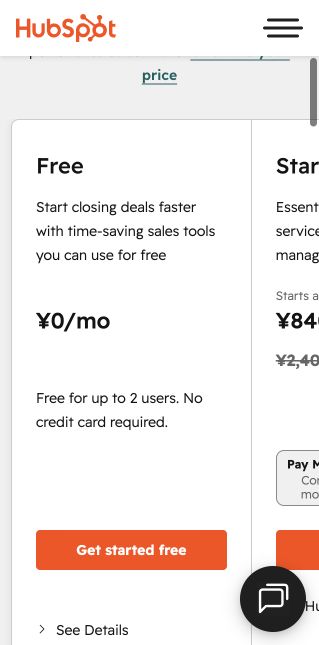
HubSpot Free and Zoho CRM Free solve the same basic problem with different philosophies. HubSpot provides a broad connected starting point for up to two users. Zoho CRM’s free edition supports up to three users and offers a more traditional, configurable CRM experience. The best choice depends less on the number of features than on team size and operating style.
Verified free-plan boundary table
| Decision point | HubSpot Free | Zoho CRM Free | What to test |
|---|---|---|---|
| Users | Up to 2 | Up to 3 | List every person who must edit records—not just view a report. |
| Core CRM records | Free Smart CRM; HubSpot currently states 1,000 contacts | Basic lead, contact, and deal tracking | Import 20 representative records and export them again. |
| Sales pipeline | 1 deal pipeline | Basic deal tracking; confirm current edition limits | Build the same stages, required fields, and next-action rules. |
| Reusable sales content | Up to 3 snippets and 3 email templates per account | Confirm the exact free-edition limits in the current feature matrix | Create the three messages the team sends most often. |
| Scheduling | Maximum 1 personal meetings link, with HubSpot branding | Verify the required calendar workflow before committing | Book, reschedule, cancel, and confirm time-zone behavior. |
| Automation | Free tools include limited actions; paid packaging expands automation | Official edition guide lists workflows with limited actions | Reproduce one assignment or follow-up rule end to end. |
Limits above were rechecked against the vendors’ official public pricing and edition documentation on August 11, 2026. Product packaging changes; use the linked source record below before signing up.
Quick reference
| HubSpot Free users | Up to 2 according to HubSpot’s current official pricing page |
| Zoho CRM Free users | Up to 3 according to Zoho’s current edition comparison |
| HubSpot strength | Connected sales, marketing, service, meetings, and chat entry |
| Zoho strength | Traditional CRM structure and customization at a low-cost upgrade path |
| Verify before signup | Free limits and paid packaging can change |


Editorial concept images for decision planning; they are not product-interface screenshots.
Choose HubSpot for a connected starting point
HubSpot is the easier recommendation for one or two people who want CRM records connected to forms, meetings, email tools, chat, and a larger customer-platform ecosystem. The interface guides a founder toward a usable pipeline quickly. Its most important constraint is the two-user free limit and a paid path that becomes a larger commitment when advanced automation and reporting are required.
Choose Zoho for three users and configuration depth
Zoho CRM is attractive when three people need access without paying immediately, or when the team values configurable modules, fields, workflows, and reports. The trade-off is setup attention. The interface and wider Zoho catalog require a clearer owner and more deliberate training.
Compare the first paid plan now
Do not choose a free CRM without pricing the next likely tier. List the first capability that will force an upgrade—another user, automation, reporting, multiple pipelines, permissions, communication volume, or support. Calculate annual cost at five users, then compare the migration cost of switching later.
Run a seven-day test
Create the same 20 contacts, ten deals, two email templates, three tasks, and one weekly report in both systems. Have every intended user complete a real follow-up workflow. Score time to complete, clarity of next actions, record quality, reporting usefulness, and administration effort. Keep the system the team will maintain without policing.
Action checklist
- Confirm current free-user limits
- Define the next likely upgrade trigger
- Build the same sample pipeline in both tools
- Test email and calendar workflow
- Export sample data from both
- Price five users on the likely paid tier
- Choose based on adoption and total cost
Common mistakes to avoid
- Choosing solely because one tool has more features
- Ignoring the third user requirement
- Evaluating only the free tier
- Importing the full database before a workflow test
Official sources
- HubSpot Free Tools pricing and limits (accessed August 11, 2026)
- Zoho CRM editions (accessed August 11, 2026)
- Zoho CRM edition and role guide (accessed August 11, 2026)
Frequently asked questions
Is HubSpot Free better than Zoho CRM Free?
HubSpot is often better for one or two users wanting connected tools; Zoho can be better when three users or deeper CRM configuration matter.
Which is easier to use?
HubSpot generally offers the faster initial setup, while Zoho rewards a team willing to configure the system more deliberately.
Can I switch from Zoho to HubSpot later?
Yes, but fields, relationships, activities, workflows, and historical engagement require careful mapping and validation.
Put this guide into practice
Use the free planning tools
Decision workbook
Three users versus five: test the upgrade trigger
A free CRM decision often changes when a fourth or fifth person needs to edit records. Do not compare only the free-plan logos. Write down who must create contacts, move deals, edit fields, run reports, and administer the account. A view-only stakeholder is different from an active seller, and a shared login is not a safe workaround.
| Role | Must edit CRM? | Weekly task | Failure if excluded |
|---|---|---|---|
| Sales owner | Yes | Update deal stage and next action | Pipeline becomes stale |
| Founder | Decide | Review forecast and exceptions | May only need reporting access |
| Marketing | Decide | Check source and consent | Handoffs may remain manual |
| Operations | Decide | Correct data and export backups | Admin work stays with sellers |
Run the same 20-opportunity test in both products. Record setup minutes, missing fields, manual handoffs, export quality, and the first requirement that forces an upgrade. If Zoho’s free-user allowance covers every active editor and the workflow survives the test, its seat economics may be decisive. If the team needs HubSpot’s connected marketing, service, or marketplace workflow, calculate the first paid year instead of treating the free edition as the final architecture.
Pass condition: every active editor can complete one real week without shared credentials, duplicate spreadsheets, or an undocumented workaround. Fail condition: the free plan changes ownership, reporting, or data quality simply to remain free.
Verified research record
How this guide was checked
Editorial owner
Rena Ozone (小曽根玲奈)
Representative member, RIA LLC
Reviewer profile and standards
Evidence level
Official-source desk research
Pricing, limits, documentation, and export requirements checked August 8, 2026. We never label a product hands-on tested unless an authenticated workflow was completed.
Northstar scoring model
Free-user fit 30% · setup speed 20% · customization 20% · paid path 20% · export 10%. Scores are situation-specific and never increase because a product has an affiliate program.
Five-user cost check
Compare the first paid tier at five active users rather than assigning a zero cost to free software. Include configuration and training time. Confirm Zoho’s regional edition limits before deciding.
Who should not use this recommendation
HubSpot Free is not for three or more active CRM users. Zoho is not ideal when nobody will own configuration and the team needs the fastest possible adoption.
Reproducible verification checklist
| Check | What to record | Pass condition |
|---|---|---|
| Plan and seat rules | Selected edition, paid seats, billing interval, currency, and tax treatment | The same configuration can be priced again from the official page |
| Workflow fit | One lead from capture through assignment, follow-up, and close | No required step depends on an undocumented workaround |
| Data portability | Export format, identifiers, associations, activities, and attachments | A sample export opens cleanly and preserves required fields |
| Upgrade trigger | The first limit that forces a paid plan or add-on | The trigger is tied to an actual team requirement |
Additional official source: Zoho CRM edition guide (checked August 9, 2026).
Next verification stage: authenticated free-plan setup, timed onboarding, a 20-record import, one real pipeline workflow, export, and original dashboard captures. Results will be added only after completion.
Continue your CRM research
Compare the software after defining the workflow.
Use these requirements and checklists before opening vendor pricing pages. Then test the same real-world scenario in each shortlisted product.
Editorial note: this guide was researched and reviewed by the Northstar Select editorial team on August 8, 2026. Commercial details should be reconfirmed before purchase.