
Affiliate Disclosure: We may earn a commission if you later purchase through a qualifying link, at no extra cost to you. No affiliate links are active in this article at publication. Rankings and criticism are independent. See our editorial policy.
Part of our CRM Software Guides for Small Businesses library.
Our recommendation
HubSpot is best overall; Zoho wins for three full users.
HubSpot offers the most useful connected starting point for one or two people. Zoho CRM gives a three-user startup more traditional CRM depth. Freshsales is a strong alternative for a phone-oriented team.
A free CRM should solve a real operating problem: names are scattered across inboxes, follow-ups depend on memory, and nobody can answer how much qualified revenue is in the pipeline. It should not merely postpone the problem until the startup has imported all its data and discovered that a basic team feature requires a large upgrade.
We compared HubSpot, Zoho CRM, Freshsales, Bigin by Zoho, and Bitrix24 because each offers a permanent free edition or a clearly marketed no-cost starting point. Pipedrive is excluded from this free-plan ranking because its no-cost access is a 14-day trial, not a free edition.
How we evaluated free CRM software
- Usable seats: Can the people who actually sell own records, update deals, and see the pipeline?
- Core workflow: Does the free edition include contacts, companies, deals, tasks, and follow-up reminders?
- Data portability: Can the startup export records and avoid becoming trapped by its own history?
- Upgrade economics: What does the first genuinely useful paid tier cost for the team?
- Adoption: Will a founder update it during a busy week without an administrator enforcing the habit?
Free-plan limits change frequently. The facts below were checked against official vendor information on August 7, 2026. Verify current limits before importing sensitive or business-critical data.
Free CRM comparison
| CRM | Free users | Best free-plan strength | Main limitation | Best for |
|---|---|---|---|---|
| HubSpot | Up to 2 | Connected sales, marketing, service, meetings, and chat | Two-user ceiling; shallow automation | Founder-led startups |
| Zoho CRM | Up to 3 | Traditional CRM depth, workflows, reports, mobile app | More setup and interface friction | Three-person sales teams |
| Freshsales | Up to 3 | Clean sales workflow and communication focus | Advanced automation and AI require paid tiers | Teams selling by phone and email |
| Bigin | Single-user free option varies by region | Simple pipelines without enterprise complexity | Lower ceiling than full Zoho CRM | Solo founders and microbusinesses |
| Bitrix24 | Multiple users on free plan | CRM plus collaboration and task tools | Dense interface and broad feature sprawl | Teams prioritizing all-in-one collaboration |


Editorial concept images for decision planning; they are not product-interface screenshots.
The best free CRMs for startups
1. HubSpot — best free CRM overall
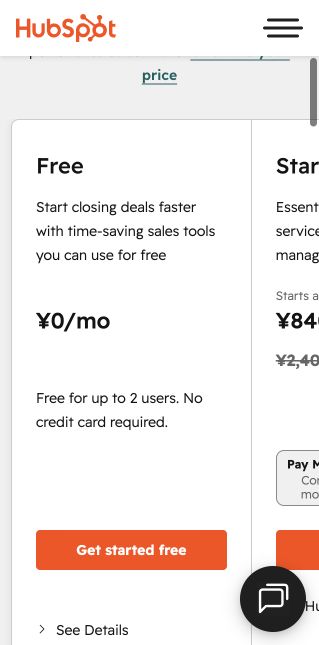
HubSpot's free tools cover the widest useful path from first website conversation to sales follow-up. The official product information lists contact, deal, and task management; email tracking and templates; meeting scheduling; document sharing; live chat; and sales quotes. The current free account supports up to two users and around 1,000 contacts.
The appeal is not only the number of tools. They share the same contact record. A founder can publish a meeting link, see the prospect in the CRM, track the deal, and later add service or marketing capabilities without immediately moving data between products.
The limits are deliberate. Two users is a hard constraint for a growing team. Email tracking notifications, templates, pipelines, automation, and reporting remain limited. HubSpot's paid path also becomes expensive when a company needs Sales Hub Professional features such as sequences, forecasting, custom reporting, and deeper automation. Start free, but write down the future price before the system becomes indispensable.
Choose HubSpot if: one or two people own revenue today; inbound forms, meetings, and email matter; and the company may later connect marketing and service.
2. Zoho CRM — best for three full users
Zoho CRM's free edition supports up to three users and includes the traditional objects a young sales team expects: leads, contacts, accounts, deals, tasks, events, documents, reports, mobile apps, and basic workflow capability. For a three-person startup, that extra seat can matter more than HubSpot's wider free toolset.
Zoho also has a smoother paid ladder. Official annual pricing has historically positioned Standard around $14 per user per month and Professional around $23, although local pricing and packaging vary. The platform can grow into advanced customization without the dramatic price jump associated with some competitors.
The cost is attention. Setup screens are denser, the wider Zoho catalog can be confusing, and the system rewards an owner who is willing to configure fields and views. A startup that values speed over control may abandon it. A slightly technical operator can extract remarkable value.
Choose Zoho CRM if: three people need genuine CRM access, budget discipline matters, and someone will own configuration.
3. Freshsales — best free sales-first alternative
Freshsales offers a free option for up to three users and emphasizes contact management, deal tracking, email, and sales communication. The interface is more immediately sales-oriented than a broad business suite, which helps a small team move from signup to an active pipeline quickly.
Freshsales is particularly worth testing when calls and direct outreach matter. Its wider product family supports phone and communication workflows, though usage, numbers, regions, and specific capabilities depend on plan and location. Confirm the exact free allowance during signup.
The upgrade point arrives when the team needs richer automation, sequences, advanced reports, governance, or AI features. Freshworks' own current material notes paid plans beginning around $15 per user per month on monthly billing, with annual offers potentially lower.
Choose Freshsales if: a three-person team wants a clean, sales-first system and values direct communication workflows.
4. Bigin by Zoho — best for the smallest pipeline
Bigin is Zoho's simplified pipeline CRM. It removes much of the configuration surface of full Zoho CRM and organizes contacts, companies, activities, and pipelines around a more approachable workflow. For a solo founder, consultant, or micro-agency, that smaller scope can produce better data than a powerful platform nobody maintains.
Availability and user limits for the free edition can vary by market, so confirm the local signup offer. The structural limitation is the ceiling: startups that need advanced forecasting, complex permissions, custom modules, territories, or sophisticated automation will move to a paid Bigin tier or migrate to Zoho CRM.
Choose Bigin if: one person needs a real pipeline, simplicity is more important than ecosystem breadth, and the sales process is unlikely to become highly complex soon.
5. Bitrix24 — best free all-in-one workspace
Bitrix24 combines CRM with tasks, collaboration, communication, forms, and other business tools. Its free offering can accommodate more collaborators than the strict two- or three-user CRM plans above, which makes it attractive to a cash-constrained team that also needs an internal workspace.
The breadth is also the weakness. Navigation is dense, terminology takes time to learn, and a startup can spend more energy configuring the workspace than following up with leads. Evaluate it for a week with real data; if the team cannot identify today's open activities within seconds, the apparent value is not operational value.
Choose Bitrix24 if: multiple collaborators need access and replacing several lightweight tools matters more than having the cleanest CRM interface.
When should a startup upgrade?
Upgrade because a documented revenue process needs a capability, not because a banner says the account is ready. Common valid triggers include:
- A third or fourth salesperson needs to own and update records.
- Different motions require multiple pipelines, permissions, or teams.
- Leads need automatic assignment and timed follow-up.
- Reps need repeatable sequences rather than individual templates.
- Management needs forecasting, conversion reporting, or custom dashboards.
- Marketing and sales require a reliable lifecycle and handoff workflow.
Before upgrading, calculate annual cost for the likely team size at the tier containing the required feature. Include onboarding, calling, email volume, AI credits, data enrichment, and add-ons. A $15 headline can become a $4,000 annual system when five users, one higher-tier feature, and two add-ons are included.
A safe free-CRM setup checklist
- Define no more than six deal stages, each with an observable exit condition.
- Create required fields only for data the team will use in a decision.
- Assign one owner to every open deal.
- Require a next activity and date on every active opportunity.
- Import only active prospects first; archive or clean the spreadsheet separately.
- Export a backup after the first week and test that the data is usable.
- Review the pipeline inside the CRM every week so the tool becomes the source of truth.
Final recommendations by startup type
- Solo founder or two-person startup: HubSpot Free is the strongest general recommendation.
- Three-person sales team: Zoho CRM Free offers the most conventional CRM capability without paying for seats.
- Phone- and email-led sales: Test Freshsales alongside Zoho and confirm communication allowances in your region.
- Solo consultant with a simple pipeline: Bigin can be easier to maintain than a full platform.
- Startup needing collaboration plus CRM for several people: Bitrix24 is worth a trial, but adoption should decide.
Our overall pick is HubSpot because it gives an early startup a credible customer system, not merely a contact list. Zoho CRM is the better answer when the third user is non-negotiable or the founders already know they will need greater customization at a lower paid price.
Frequently asked questions
What is the best free CRM for a startup?
HubSpot is the best overall choice for one or two users. Zoho CRM is better when three people need full CRM access. The right answer changes if the startup prioritizes calling, advanced customization, or a broad collaboration suite.
Is free CRM software really free?
The products listed here have no-cost editions rather than only timed trials, but every free edition limits users, automation, reporting, storage, communication usage, or advanced features. Review the next paid tier before committing data.
Can a startup use a spreadsheet instead?
Yes, while lead volume is low and one person owns every follow-up. Move to a CRM when ownership, history, or next actions become unclear. A CRM should reduce missed revenue, not add administration.
Is customer data safe in a free CRM?
A free price does not automatically mean weak security, but the startup remains responsible for access, strong authentication, permissions, exports, retention, and compliance. Review each provider's security and privacy documentation for your industry and region.
Put this guide into practice
Use the free planning tools
Verified research record
How this guide was checked
Editorial owner
Rena Ozone (小曽根玲奈)
Representative member, RIA LLC
Reviewer profile and standards
Evidence level
Official-source desk research
Pricing, limits, documentation, and export requirements checked August 8, 2026. We never label a product hands-on tested unless an authenticated workflow was completed.
Northstar scoring model
Useful free seats 30% · pipeline capability 25% · export 15% · adoption 15% · next-tier economics 15%. Scores are situation-specific and never increase because a product has an affiliate program.
Five-user cost check
Model the first paid year at five users even when today’s plan is free. HubSpot Free currently supports only two users; a five-user team must evaluate paid access. Record the exact quote before importing production data.
Who should not use this recommendation
Free CRM is a poor fit when advanced permissions, several pipelines, automated handoffs, formal forecasting, or regulated-data controls are required immediately.
Official sources checked
Reviewed August 9, 2026. Product packaging and promotional prices can change; open these vendor pages before purchasing.
Next verification stage: authenticated free-plan setup, timed onboarding, a 20-record import, one real pipeline workflow, export, and original dashboard captures. Results will be added only after completion.
Start without locking in
Run a seven-day test with 20 real opportunities.
Use the free edition for a real pipeline meeting, then compare the paid tier you would need at five users. Confirm current limits on the provider's official website.
Fact-checking note: free-plan limits and prices were checked against official vendor information on August 7, 2026 and can change. Verify current details before signup or purchase.