
Affiliate Disclosure: We may earn a commission if you later purchase through a qualifying link, at no extra cost to you. No affiliate links are active in this article at publication. Commercial relationships do not determine our conclusions. See our editorial policy.
Part of our CRM Software Guides for Small Businesses library.
The short answer
Choose Pipedrive for sales focus. Choose HubSpot for platform breadth.
Pipedrive is the cleaner daily tool for a team whose job is moving deals. HubSpot is the stronger starting point when the CRM must eventually connect marketing, sales, and service.
HubSpot and Pipedrive often appear on the same shortlist, but they are not trying to become the same product. Pipedrive is a sales pipeline with supporting tools around it. HubSpot is a customer platform whose free CRM acts as the front door to sales, marketing, service, content, and data products.
That difference matters more than a feature checklist. A five-person outbound team may find HubSpot unnecessarily broad. A founder building inbound marketing, sales handoff, and customer support may outgrow Pipedrive's narrower center of gravity. The right choice depends on the operating model you want in 18 months, not only the pipeline you need this afternoon.
HubSpot vs Pipedrive: quick comparison
| Category | HubSpot | Pipedrive |
|---|---|---|
| Best for | Businesses combining sales, marketing, and service | Small teams focused primarily on closing deals |
| Free option | Free tools for up to 2 users | No free plan; 14-day trial |
| Paid entry | Starter pricing varies by product and promotion | Lite: $14/user/month annually |
| Strong sales tier | Sales Hub Professional: about $100/user/month | Growth: $39/user/month annually |
| Pipeline experience | Good, with wider customer context | Excellent and highly focused |
| Marketing | Native tools and shared customer records | Basic Campaigns add-on |
| Automation | Powerful at Professional and above | Practical sales automation on Growth |
| Reporting | Broad; custom reporting on higher tiers | Clear sales reports and forecasts |
| Complexity risk | Hubs, seats, contacts, and credits can complicate cost | Add-ons and tier limits raise the real price |
Pricing: compare the plan you will need, not the cheapest logo
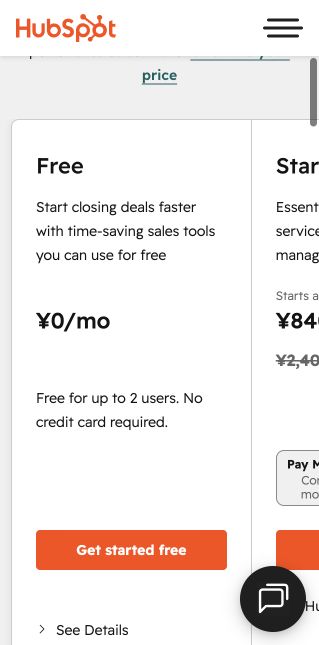
HubSpot's free tools remain the best low-risk way for a founder or two-person team to leave spreadsheets. HubSpot currently describes the free level as $0 for up to two users, with contact, company, deal, task, email-tracking, meeting-scheduling, and live-chat tools. It is not a timed trial.
The complication begins when the team needs more seats or serious sales execution. Promotional Starter prices vary, and the package uses different seat concepts. The important planning number is Sales Hub Professional, currently presented around $100 per sales seat per month. That is where sequences, forecasting, custom reporting, prospecting tools, and deeper automation become central. A five-seat sales team can therefore move from an inexpensive start to roughly $6,000 per year before additional products or usage.
Pipedrive is easier to model. It has no permanent free plan. Its current annual-billing prices are $14 for Lite, $39 for Growth, $59 for Premium, and $79 for Ultimate, per seat per month. Lite manages leads, calendars, and pipelines, but Growth is the practical floor for many active teams because it adds full email sync, tracking, automations, nurturing sequences, subscriptions, forecasts, and the meeting scheduler.
For five users, Pipedrive Growth is about $2,340 per year before tax and add-ons. LeadBooster, Projects, Campaigns, Web Visitors, and Smart Docs can add meaningful cost. The comparison is therefore not "free versus $14." It is often "HubSpot Professional at around $100 per sales seat versus Pipedrive Growth at $39," with HubSpot delivering a broader platform and Pipedrive delivering a more concentrated sales tool.


Editorial concept images for decision planning; they are not product-interface screenshots.
Daily use: Pipedrive wins focus; HubSpot wins context
Pipedrive is built around the next activity
Pipedrive's strongest idea is simple: every open deal should have a next action. Reps see the pipeline immediately, drag deals between stages, and identify records without a scheduled follow-up. That structure works particularly well for consultative sales, agencies, recruiters, and small B2B teams with a repeatable process.
The product also has less conceptual overhead. A new rep can understand people, organizations, deals, activities, and pipelines without learning an entire customer-platform vocabulary. That usually translates into faster adoption, which matters because an elegant CRM with incomplete data is still a failed CRM.
HubSpot carries more of the customer story
HubSpot's advantage appears when a lead has history outside the salesperson's inbox. Form submissions, marketing emails, meetings, support conversations, page activity, and sales interactions can sit on the same contact timeline when the relevant tools are enabled. A rep receives richer context, while marketing can measure what happens after a lead becomes an opportunity.
The trade-off is surface area. Teams can encounter properties, lists, lifecycle stages, lead status, campaigns, workflows, hubs, seats, and credits. None is individually unreasonable, but governance becomes important as the portal grows. Without naming conventions and ownership, HubSpot can become a polished version of the same data disorder it replaced.
Automation, email, and reporting
Pipedrive Growth covers the automations most small sales teams actually request: create an activity when a deal changes stage, send or schedule email sequences, notify an owner, and keep follow-ups moving. Its reporting remains close to sales questions: conversion, activity, revenue, duration, and forecasts. This is enough for a manager who wants to run a weekly pipeline meeting without building a data operation.
HubSpot's ceiling is much higher. Professional workflows can coordinate records and processes across the platform, while sequences support structured rep outreach. Custom reporting can connect activity, pipeline, marketing, and customer data. That power is valuable for a company with distinct marketing, sales, and service functions; it is excessive for a three-person team that only needs reliable reminders.
For email, both products connect major inboxes and log communication. Pipedrive's full email sync begins on Growth. HubSpot's free level provides basic email integration and limited tracking; higher editions raise limits and add sales productivity features. If bulk marketing email is a strategic channel, HubSpot has the stronger native path. Pipedrive Campaigns is a paid add-on and should be evaluated as a separate purchase.
Migration and long-term fit
Choose the system that matches the direction of your complexity. Moving from Pipedrive to HubSpot later is possible, but mapping custom fields, activity history, owners, products, and automation rules deserves a real migration plan. Starting in HubSpot avoids that future platform move, but only if the organization is willing to pay for and govern the larger system when it matures.
Before committing, import 20 live deals into each trial. Connect one inbox, create the real pipeline stages, schedule the next activity on every deal, and reproduce one weekly report. Do not use sample data. The CRM that exposes missing follow-ups with the least administrative effort is usually the better operational choice.
Final verdict
- Choose HubSpot if you have one or two users today, want a legitimate free start, generate inbound demand, or expect sales, marketing, and service to share one customer platform.
- Choose Pipedrive if you have a focused sales team, care most about rep adoption and pipeline discipline, and prefer a lower, easier-to-model mid-tier price.
- Stay on the free HubSpot tools if your process is still being discovered. Do not buy automation before the stages and ownership rules are stable.
- Budget for Pipedrive Growth, not Lite, if email sync and automation are part of the purchase rationale.
For most 3–10 person pure sales teams, Pipedrive is our practical recommendation. For a founder-led business that is building an inbound engine and wants one customer record across departments, HubSpot is the more strategic choice—provided the future Professional-tier cost is visible in the decision today.
Frequently asked questions
Is HubSpot or Pipedrive better for a small business?
HubSpot is usually better for a business that needs a free starting point or plans to connect marketing, sales, and service. Pipedrive is usually better for a small, dedicated sales team that wants the simplest pipeline and can pay for every user.
Does Pipedrive have a free plan?
No. Pipedrive offers a 14-day free trial. HubSpot's free tools are available without an expiration date for up to two users, subject to product limits.
Which CRM is easier to use?
Pipedrive is easier for pure deal tracking because it stays centered on pipelines and activities. HubSpot is approachable at the free level but becomes more complex as hubs, automation, and reporting expand.
Can I migrate later?
Yes. Both products support imports and have partner ecosystems, but activity history, associations, custom fields, and workflow logic require careful mapping. Export clean backups before any migration.
Put this guide into practice
Use the free planning tools
Verified research record
How this guide was checked
Editorial owner
Rena Ozone (小曽根玲奈)
Representative member, RIA LLC
Reviewer profile and standards
Evidence level
Official-source desk research
Pricing, limits, documentation, and export requirements checked August 8, 2026. We never label a product hands-on tested unless an authenticated workflow was completed.
Northstar scoring model
Daily workflow 30% · five-seat cost 25% · automation 20% · reporting 15% · portability 10%. Scores are situation-specific and never increase because a product has an affiliate program.
Five-user cost check
HubSpot Starter: ¥50,400/year at the promotional ¥840 seat rate shown on August 8, 2026 (standard displayed rate: ¥144,000/year). Sales Hub Professional: ¥648,000/year for five seats plus the displayed ¥180,000 required onboarding, or ¥828,000 in year one.
Who should not use this recommendation
Do not choose HubSpot solely for the free account if five people need edit access. Do not choose Pipedrive when one connected marketing, sales, and service platform is essential.
Official sources checked
Reviewed August 9, 2026. Product packaging and promotional prices can change; open these vendor pages before purchasing.
Next verification stage: authenticated free-plan setup, timed onboarding, a 20-record import, one real pipeline workflow, export, and original dashboard captures. Results will be added only after completion.
Before you choose
Test one real sales week.
Pricing and packaging change frequently. Verify the current offer on each provider's official site and run your actual pipeline review inside the trial.
BEFORE THE DEMO
Turn buying criteria into a testable CRM requirements document
Use the editable Word document, 60-point Excel workbook, or private browser checklist to classify priorities, assign owners, write acceptance tests, and compare vendor evidence before choosing a plan.
Fact-checking note: prices and plan terms were checked against official vendor information on August 7, 2026 and can change. Verify current details before purchasing.