
Affiliate Disclosure: We may earn a commission if you later purchase through a qualifying link, at no extra cost to you. No affiliate links are active in this article at publication. Recommendations and criticism are independent. See our editorial policy.
Part of our CRM Software Guides for Small Businesses library.
Search goal
Calculate a realistic five-user HubSpot budget
HubSpot pricing for 5 users: see 2026 first-year and renewal estimates for Starter, Sales Hub Professional, and Enterprise, including onboarding.
A five-person HubSpot quote can mean several very different things. Five people may only need basic CRM access, or all five may require professional sales features. Marketing contacts, onboarding, calling, credits, and adjacent hubs can matter more than the advertised per-seat price. This worksheet turns a pricing-page visit into a defensible annual budget.
Quick reference
| Free | Up to 2 users; not a five-user operating plan |
| Starter | Currently advertised from $7 per seat monthly on an annual promotional rate; standard pricing may differ |
| Sales Hub Professional | Currently advertised from $90 per seat monthly with annual commitment |
| Professional onboarding | The current Sales Hub page lists a required one-time $1,500 fee |
| Enterprise | Currently advertised from $150 per seat monthly |
| Important | Prices, promotions, currencies, taxes, and packaging can change |


Editorial concept images for decision planning; they are not product-interface screenshots.
HubSpot cost for five users at a glance
| Sales Hub edition | Advertised seat basis | Five-user recurring cost | Estimated year-one total |
|---|---|---|---|
| Starter | $7/seat/month, annual promotional rate | $420/year | $420 before add-ons and tax |
| Professional | $90/seat/month, annual commitment | $5,400/year | $6,900 with required $1,500 onboarding |
| Enterprise | $150/seat/month | $9,000/year | $12,500 with required $3,500 onboarding |
Calculation: advertised monthly seat price × 5 users × 12 months, plus required onboarding where listed. Verify the live quote before purchasing.
Model your exact five-user cost →
Start with roles, not a plan name
List the five people and what each must do: edit contacts, own deals, use sequences, forecast, build reports, administer the account, or only view results. Paying for identical access when roles differ can inflate cost. Conversely, assigning a limited seat to someone who must work deals creates a shadow spreadsheet and destroys the benefit of the CRM.
Build three budget scenarios
Calculate a minimum scenario, a realistic scenario, and a growth scenario. The minimum uses the lowest tier that supports today’s workflow. The realistic scenario includes the feature the team will probably need within six months. The growth scenario adds expected hires, contact growth, onboarding, and one integration. Annualize every recurring charge and keep one-time fees separate.
Do not mix Sales Hub and Customer Platform pricing
HubSpot sells individual hubs and a broader customer platform bundle. A team that only needs sales execution should compare Sales Hub with sales-focused competitors. A company replacing CRM, marketing automation, service, content, and data tools may find a platform bundle more rational. Compare like with like by listing which existing subscriptions would actually be cancelled.
Calculate the value threshold
For a five-person team, define the revenue or labor improvement required to justify the annual total. If software costs $8,000 annually and gross margin is 50%, it must contribute more than $16,000 of incremental revenue—or equivalent labor savings—to break even. This is a planning model, not a promise of results.
Action checklist
- Name all five users and required actions
- Separate core, sales, and view-only access
- Record monthly and annual commitment prices
- Add mandatory onboarding
- Model marketing contact growth separately
- Include credits, calling, integrations, and tax
- Calculate year-one and renewal-year totals
Common mistakes to avoid
- Multiplying one headline seat price by five and stopping
- Assuming a temporary promotional price is permanent
- Ignoring required onboarding
- Buying a multi-hub bundle without identifying replaced tools
Official sources
- HubSpot Sales Hub pricing (accessed August 8, 2026)
- HubSpot Customer Platform pricing (accessed August 8, 2026)
Frequently asked questions
How much is HubSpot for five users?
The answer depends on edition, seat type, billing commitment, onboarding, and other hubs. Use the current official configurator and calculate a year-one total.
Is HubSpot Free enough for five people?
No for five active CRM users: the current free account supports up to two users.
Is HubSpot Professional worth it?
It can be when automation, sequences, forecasting, and reporting create measurable value that exceeds the full annual cost.
Put this guide into practice
Use the free planning tools
Five-user worksheet
Rebuild the quote from six auditable inputs
A trustworthy five-user estimate should be reproducible by another person. Save the date, currency, billing interval, selected edition, paid-seat count, and every mandatory one-time charge. Promotional prices belong in a separate column from renewal prices so a temporary discount never becomes the planning baseline.
| Input | Value to capture | Annual formula |
|---|---|---|
| Paid seats | 5, unless roles permit fewer | Seats × monthly seat price × 12 |
| Platform fee | Monthly account-level charge | Monthly platform fee × 12 |
| Usage and add-ons | Credits, calling, data, or other required capacity | Expected monthly usage × 12 |
| Onboarding | Mandatory vendor charge | Add once in year one |
| Migration and training | Internal or external implementation estimate | Add once, with contingency |
| Renewal | Non-promotional recurring total | Model separately from year one |
Use two totals: first-year total = recurring subscription + onboarding + migration + training; renewal-year total = recurring subscription at the expected renewal price. Divide the first-year total by five only after account-level charges are included. A per-seat figure that omits onboarding or required add-ons is not the true first-year cost.
Before approval, ask one person who did not prepare the estimate to reproduce it from the saved official pages. The worksheet passes when the second calculation reaches the same total and every line has a current source. It fails when the total depends on an expired promotion, an assumed seat type, or a feature that has not been mapped to a specific edition.
Verified research record
How this guide was checked
Editorial owner
Rena Ozone (小曽根玲奈)
Representative member, RIA LLC
Reviewer profile and standards
Evidence level
Official-source desk research
Pricing, limits, documentation, and export requirements checked August 8, 2026. We never label a product hands-on tested unless an authenticated workflow was completed.
Northstar scoring model
Year-one total 35% · renewal exposure 20% · required capability 20% · administration 15% · exit cost 10%. Scores are situation-specific and never increase because a product has an affiliate program.
Five-user cost check
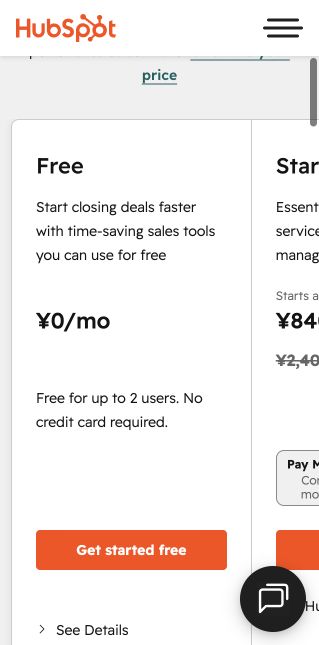
Illustrative calculation from the official JPY page: Starter promotional display ¥840 × 5 × 12 = ¥50,400/year; displayed standard rate ¥2,400 × 5 × 12 = ¥144,000/year. Professional ¥10,800 × 5 × 12 plus ¥180,000 onboarding = ¥828,000 in year one.
Who should not use this recommendation
Professional is not justified when the team only needs contact records, one pipeline, basic follow-up, and simple reporting. A promotional price is not a renewal assumption.
Reproducible verification checklist
| Check | What to record | Pass condition |
|---|---|---|
| Plan and seat rules | Selected edition, paid seats, billing interval, currency, and tax treatment | The same configuration can be priced again from the official page |
| Workflow fit | One lead from capture through assignment, follow-up, and close | No required step depends on an undocumented workaround |
| Data portability | Export format, identifiers, associations, activities, and attachments | A sample export opens cleanly and preserves required fields |
| Upgrade trigger | The first limit that forces a paid plan or add-on | The trigger is tied to an actual team requirement |
Additional official source: HubSpot free CRM product page (checked August 9, 2026).
Next verification stage: authenticated free-plan setup, timed onboarding, a 20-record import, one real pipeline workflow, export, and original dashboard captures. Results will be added only after completion.
Continue your CRM research
Compare the software after defining the workflow.
Use these requirements and checklists before opening vendor pricing pages. Then test the same real-world scenario in each shortlisted product.
BEFORE THE DEMO
Turn buying criteria into a testable CRM requirements document
Use the editable Word document, 60-point Excel workbook, or private browser checklist to classify priorities, assign owners, write acceptance tests, and compare vendor evidence before choosing a plan.
Editorial note: this guide was researched and reviewed by the Northstar Select editorial team on August 8, 2026. Commercial details should be reconfirmed before purchase.