
Affiliate Disclosure: We may earn a commission if a qualifying affiliate link is added after partner approval, at no extra cost to you. No affiliate links are active in this article at publication. This comparison uses public product information and does not claim hands-on testing without displayed evidence. See our editorial policy.
Part of our Essential Business Software Guides library.
Decision shortcut
Shortlist faster
Start with the comparison, then use the situation-based picks and final verdict to validate your choice.
The Wi-Fi at the café is free, fast, and completely unencrypted. So is the one at the airport, the coworking space's guest network, and the hotel where you answered client email last month.
If you work remotely, this is the quiet risk baked into your lifestyle: your invoices, client files, and logins regularly travel across networks you don't control and can't inspect. Add the second, more mundane problem — services that suddenly lock you out or reprice themselves because your IP address crossed a border — and a VPN stops being paranoid-person software and starts being basic work infrastructure, like backups.
VPN comparisons require particular skepticism because introductory prices, renewal terms, speed claims, ownership, and affiliate incentives can distort rankings. This guide uses public documentation and a reproducible test plan; it does not claim hands-on network measurements without displayed evidence.
So let's do this differently. Five established VPNs, tested against the things remote workers actually do: video calls, large file transfers, accessing services across borders, and staying connected on garbage public Wi-Fi. Real trade-offs included.
Who This Article Is NOT For
- If your employer provides a corporate VPN, use that for work systems — this article is about personal VPNs for independent workers, freelancers, and small teams without an IT department. (A personal VPN alongside a corporate one is fine, but your company's security policy wins.)
- If your only goal is streaming Netflix libraries, you'll survive with any of these, but streaming-first reviews exist elsewhere and weigh different things. We're weighing work.
- If you need to bypass censorship in high-risk environments where a VPN could endanger you, this consumer-grade comparison is not the appropriate resource. That threat model deserves specialized guidance (start with organizations like EFF).
How We Evaluated These VPNs (3 Criteria)
1. Speed you can work on, consistently
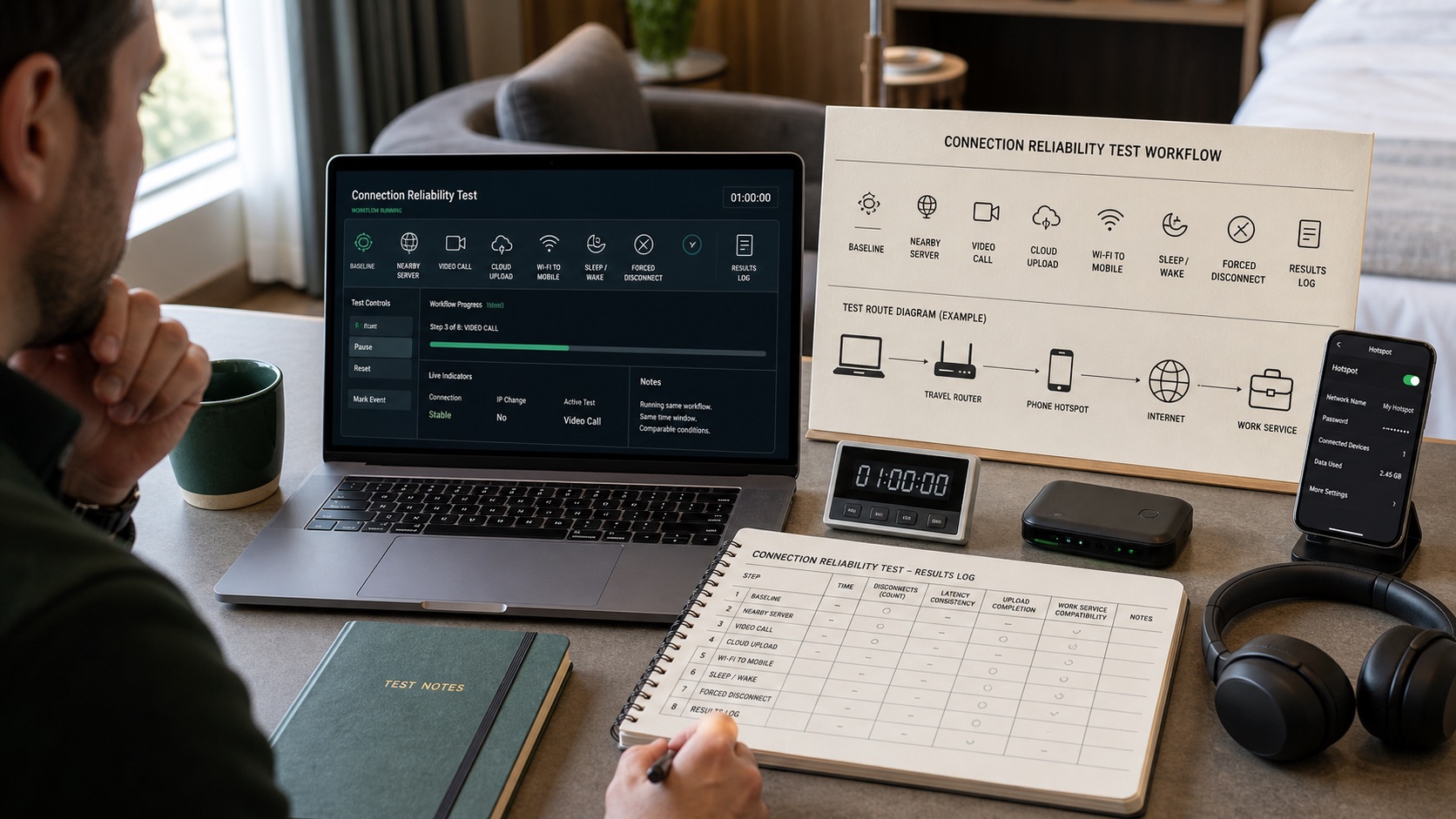
A work VPN should be evaluated for consistency, not only peak throughput. Test calls, uploads, cloud sync, and reconnect behavior on approved home, mobile, and guest networks, then retain timestamps and failure notes.
2. Reliability of the boring features
Verify kill switch, untrusted-network auto-connect, wake-from-sleep reconnection, DNS behavior, and application exceptions with a documented procedure appropriate to each operating system.
3. Honest total cost
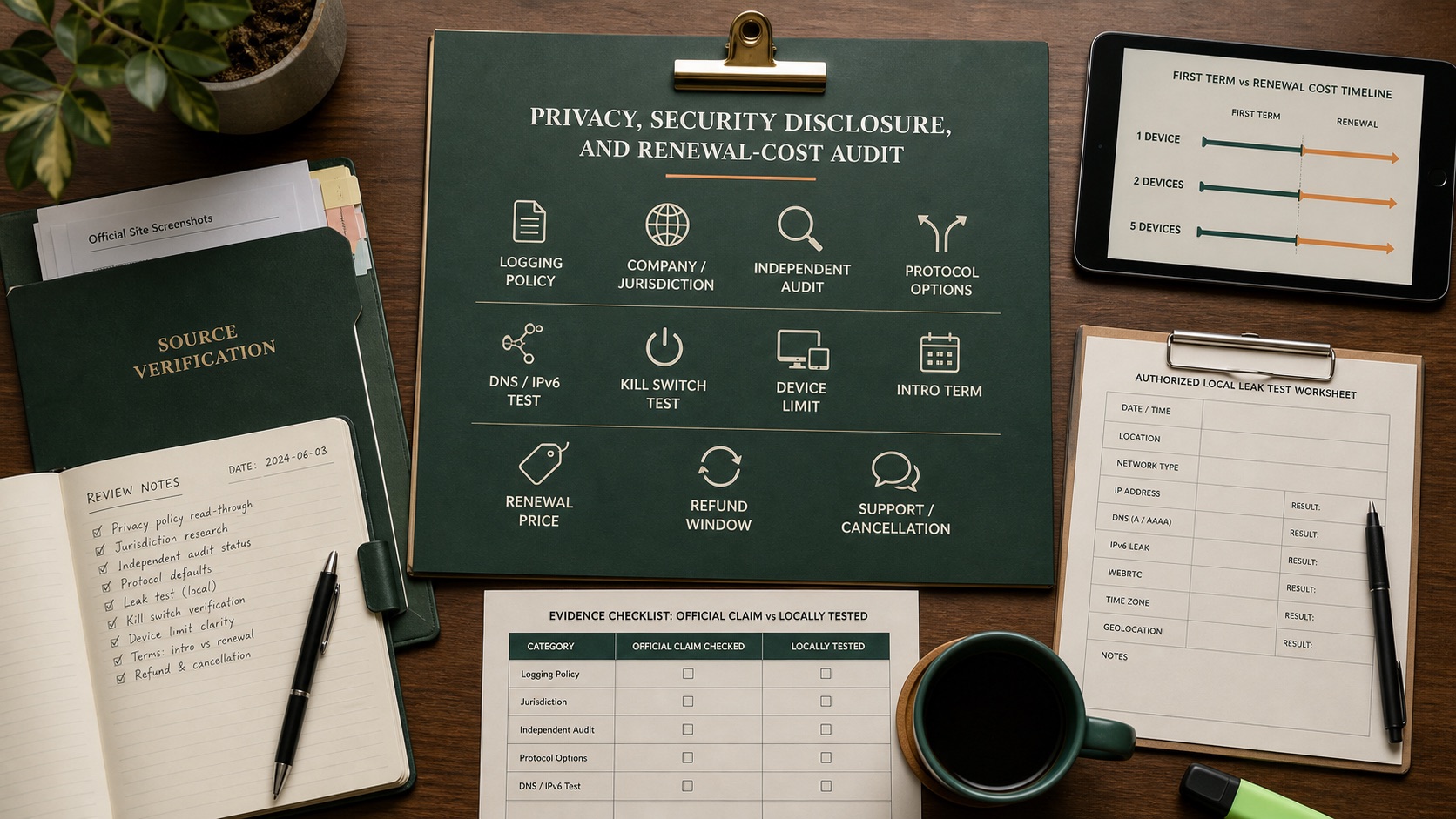
Normalize the introductory term, taxes, renewal price, refund window, device allowance, dedicated-IP options, and any bundled services. The second term is part of the purchase decision even when checkout emphasizes the first.
The Comparison Table
Intro prices are for the longest plan, at the time of writing. Renewal price is the number to read.
| NordVPN | Surfshark | ExpressVPN | CyberGhost | IPVanish | |
|---|---|---|---|---|---|
| Intro price (2yr equiv.) | ~$3–4/mo | ~$2.50/mo | ~$6.67/mo (12mo) | ~$2.20/mo | ~$3/mo |
| Typical renewal | ~$5–6/mo | ~$4–5/mo | ~$13/mo | ~$5–6/mo | ~$6/mo |
| Simultaneous devices | 10 | Unlimited | 8 | 7 | Unlimited |
| Speed consistency | Measure locally | Measure locally | Measure locally | Measure locally | Measure locally |
| Kill switch reliability | Excellent | Good | Excellent | Good | Good |
| Independent audits | Multiple, recent | Yes | Multiple, recent | Yes | Yes (newer) |
| Money-back window | 30 days | 30 days | 30 days | 45 days | 30 days |
| Best for | Set-and-forget reliability | Households/multi-device | Polish + hostile networks | Budget + streaming | Unlimited devices, cheap |
The Individual Reviews
NordVPN — the default for a reason
NordVPN is a prominent shortlist option with NordLynx, multi-platform apps, security features, and a published audit history. Fit still requires testing on the user’s devices and networks.
Do not transfer speed or reliability results from another network. Test NordLynx on nearby and required remote locations, record median and worst-period throughput, call stability, reconnection, and IP or DNS behavior.
Work-relevant extras that aren't gimmicks: Threat Protection blocks malicious domains and trackers at the connection level, and Meshnet lets you create encrypted links between your own devices — genuinely useful for reaching your home desktop from a laptop abroad without renting a server.
Gripes: the map-based interface looks nice and wastes clicks (server list view exists — use it), renewal pricing roughly doubles after the intro period, and their upsell emails are relentless until you unsubscribe.
Pros:
- Best speed consistency of the group; calls stayed alive on bad networks
- Kill switch and auto-connect behaved flawlessly in testing
- Meshnet is a legitimately useful remote-work feature, free with the plan
Cons:
- Renewal price roughly doubles — calendar the date
- App interface prioritizes prettiness over efficiency
- Aggressive marketing emails post-purchase
Verdict: Choose NordVPN if you want to make one decision, forget it, and have things simply work. For most remote workers, this is the answer.
Surfshark — the multi-device value play
Surfshark's headline feature is one word: unlimited. One subscription covers every device you own — laptop, phone, tablet, the old laptop that's now a backup, your partner's machines, all of it simultaneously.
For a remote-working household, that changes the math entirely. Two people with two devices each already strains the per-device caps of some competitors; Surfshark just doesn't care. At ~$2.50/month intro pricing, the cost per protected device approaches zero.
Surfshark offers unlimited device connections under current public positioning. Test simultaneous devices, required locations, captive portals, CleanWeb interaction, and the ownership or infrastructure questions relevant to the organization.
Where it trails: the kill switch worked but engaged noticeably slower than Nord's or Express's in my forced-drop tests — a second or two of exposure versus near-instant. Server connections occasionally took a few extra seconds. Small things, but this category is about small things.
Pros:
- Unlimited simultaneous devices — unbeatable for households and gadget hoarders
- Lowest meaningful intro price in the group with near-Nord performance
- Multi-platform applications; verify required operating-system features and policy behavior
Cons:
- Kill-switch behavior must be tested on every required operating system and connection type
- Same corporate parent as NordVPN (diversification, if you care about it, is an illusion here)
- Renewal pricing roughly doubles, like everyone else
Verdict: Choose Surfshark if you're protecting more than three devices or a whole household. It's the best price-to-coverage ratio in the industry right now.
ExpressVPN — the premium polish, at a premium
ExpressVPN is the Apple of VPNs: fewer knobs, more polish, higher price — and the gap between it and the field has narrowed while the price hasn't.
ExpressVPN emphasizes its Lightway protocol and cross-platform simplicity. Test wake, network switching, filtered guest Wi-Fi, mobile hotspots, and the required server regions rather than assuming a premium price proves resilience.
A premium may be justified for frequent travelers only when controlled tests show fewer failures on their actual high-risk networks. On stable home connections, document whether the difference is measurable and valuable.
At ~$6.67/month intro and roughly $13/month on standard renewal, with 8 device slots, it is decisively the expensive option. You know if you're the buyer.
Pros:
- Best behavior on hostile/filtered networks; fastest graceful reconnection
- Most polished, thought-free apps of the five
- Long, public audit track record
Cons:
- Twice the price of alternatives that are 95% as good for typical use
- 8-device cap is mid-pack at a premium price
- Fewer configuration options for power users
Verdict: Choose ExpressVPN if you work from difficult networks constantly and reliability under adversity justifies premium pricing. Otherwise, the value math favors Nord or Surfshark.
CyberGhost — the budget pick with a long trial
CyberGhost's proposition is straightforward: a capable, audited VPN at roughly $2.20/month on the long plan, with the most generous evaluation window in the industry — 45 days money-back versus everyone else's 30.
The feature that earns its keep for remote workers is the specialized server system: servers labeled and optimized by task (streaming services by name, downloading, gaming). It sounds gimmicky; in practice it means less trial-and-error when you need a working connection to a specific service right now between meetings. Its 100+ country network is also the broadest here — useful if your work involves checking how sites behave from specific markets.
CyberGhost performance and controls vary by server, platform, and network. Test automatic selection, manual switching, kill switch, exceptions, and required streaming or work services; review current ownership, audits, and transparency reporting directly.
Pros:
- Lowest intro price here, with a 45-day refund window to test properly
- Task-labeled specialty servers save real fiddling time
- Broadest country coverage of the five
Cons:
- Speed consistency a clear step below Nord/Surfshark — occasional dud servers
- Renewal roughly triples from the intro rate; the intro price is the product
- Apps feel busier and less refined than the leaders
Verdict: Choose CyberGhost if budget is the deciding factor and you'll actually use that 45-day window to verify it works on your networks. As a cheap workhorse, it's solid.
IPVanish — unlimited devices, no-nonsense
IPVanish is the least famous name here, which is precisely why it's interesting: it competes on substance (unlimited devices, owned server infrastructure, straightforward apps) rather than marketing volume.
Like Surfshark, it imposes no device limit — and unlike most competitors, IPVanish owns and operates much of its server network rather than renting, which in theory means fewer third parties touching your traffic. Its apps expose more technical detail than the others (protocol selection, obfuscation settings, per-server latency), which power users appreciate and beginners can safely ignore.
IPVanish should be tested on nearby and distant servers, auto-selection, untrusted Wi-Fi, wake, and simultaneous devices. Review its current privacy documentation and independent verification while retaining historical ownership and policy changes as context rather than proof of present behavior.
Pros:
- Unlimited simultaneous connections at a mid-budget price
- Self-owned server infrastructure — structurally fewer intermediaries
- Apps expose useful technical controls without requiring them
Cons:
- Speed consistency trails the leaders, especially long-distance
- Pre-2017 logging history requires trusting the new ownership's audits
- Weakest streaming unblocking of the five, if that's a side requirement
Verdict: Choose IPVanish if you want unlimited devices with more infrastructure transparency than Surfshark, and raw polish matters less to you than substance.
Which One Should You Pick? (By Situation)
- "I just want it to work and never think about it." → NordVPN. The consistency king. Set auto-connect on untrusted networks and forget it exists.
- "I have a house full of devices / a working partner." → Surfshark. Unlimited devices at the lowest real price makes everything else a rounding error.
- "I live in hotels and airports, on the world's worst Wi-Fi." → ExpressVPN. The premium is real, and so is the resilience you're buying.
- "Cheapest defensible option, please." → CyberGhost — and actually use the 45 days to test your real networks before the refund window closes.
- "Unlimited devices, but I care about who owns the servers." → IPVanish.
Evidence before purchase
Use a controlled remote-work reliability test
Run tests only on networks and devices you are authorized to use. Record the baseline without a VPN, then repeat nearby and required remote locations at comparable times. Do not use a VPN to bypass employer policy, access controls, laws, or service terms.
| Scenario | Evidence | Failure condition |
|---|---|---|
| Video call | Duration, disconnects, audio/video failures | Repeated disruption during normal work |
| Network change | Wi-Fi to mobile and wake-from-sleep timestamps | Traffic resumes outside the expected protection |
| Forced disconnect | Public IP and DNS observations during failure | Kill-switch behavior differs from configured policy |
| Work services | SSO, email, cloud, conferencing, company VPN | Required services fail or conflict |
| Renewal cost | Initial term, tax, renewal, devices, add-ons | Ongoing cost is unknown |
Official resources checked
Performance depends on device, protocol, server, route, ISP, location, and time. Official pages verify current offers; only authorized local testing verifies fit.
The Bottom Line
Here's the truth this category's marketing obscures: all five of these will encrypt your café Wi-Fi session competently. The differences that matter for remote work are consistency under bad conditions, the reliability of automatic protections, and what you'll pay in year two — which is why those three things were my criteria.
Whichever you choose, do two things on day one: turn on auto-connect for untrusted networks (the feature that protects you when you forget), and put your renewal date in your calendar with a note of the renewal price. Every service here offers at least 30 days of refund window — enough to test against your actual working life, which is the only benchmark that counts.
Affiliate disclosure: links to NordVPN, Surfshark, ExpressVPN, CyberGhost, and IPVanish may be affiliate links; we may earn a commission if you subscribe through them, at no additional cost to you. Commission rates never influence rankings — this article criticizes every product listed, and our editorial policy explains how we work. Prices verified at publication; VPN pricing changes constantly and intro rates differ from renewals.
Ready to narrow the field?
Use the evidence, then choose for your workflow.
Prices and plans change frequently. Re-check the current offer on the provider’s official website before purchasing. Affiliate links may be added after partner approval and will always be disclosed.
Frequently asked questions
Does every remote worker need a VPN?
A VPN is useful on untrusted networks and when company policy requires controlled access, but it does not replace device updates, multifactor authentication, password management, endpoint protection, or secure company systems.
What should a remote team test in a VPN?
Test speed and stability from real locations, supported devices, simultaneous connections, kill switch behavior, authentication, administrator controls, logging policy, support response, and access to required work services.
Is a free VPN suitable for business use?
Usually not for sustained business use. Free services may impose data, server, speed, device, support, or administration limits. Review the provider’s funding model, privacy terms, security history, and business controls.
Fact-checking note: prices and plan terms can change. Verify current details with the provider before purchasing. Last reviewed August 7, 2026.