
Affiliate Disclosure: We may earn a commission if a qualifying affiliate link is added after partner approval, at no extra cost to you. No affiliate links are active in this article at publication. This comparison uses public product information and does not claim hands-on testing without displayed evidence. See our editorial policy.
Part of our Creator, AI, and Online Course Platform Guides library.
Decision shortcut
Shortlist faster
Start with the comparison, then use the situation-based picks and final verdict to validate your choice.
You know your stuff. Maybe you've spent ten years in UX design, or you've coached forty clients through career changes, or you can explain sourdough hydration ratios in your sleep.
The course itself isn't the problem.
The problem is that you opened three "best course platform" articles last Tuesday, and now you have nine browser tabs, a spreadsheet you abandoned halfway through, and a creeping suspicion that you'll pick the wrong one. Because here's what those tabs don't say out loud: most course platforms charge you $39 to $149 per month before you've earned a single dollar. Pick wrong, and you're either paying for features you'll never touch, or you're six months in with 200 students and discovering that migrating them to a new platform is a genuine nightmare.
Course platforms can become expensive when a creator selects for maximum features before validating demand. This comparison uses one specific lens: a first-time course seller who needs to publish, accept payment, support students, and understand the cost before revenue is predictable.
Teachable, Thinkific, Kajabi, Podia, and LearnWorlds are compared using the same beginner workflow: build a short course, configure checkout, calculate fees, inspect student delivery, export data, and model the first year.
Who This Article Is NOT For
Let me save some of you a fifteen-minute read.
This article is not for you if:
- You want an audience handed to you. These are all self-hosted platforms — you bring the students. If you have zero audience and zero interest in building one, you want a marketplace like Udemy or Skillshare instead. You'll trade lower earnings per sale (often 75–95% less) for built-in discovery. Different game entirely.
- You're running corporate training at scale. If you need SCORM compliance, SSO, and seats for 5,000 employees, you're shopping for an LMS like Docebo or TalentLMS. LearnWorlds can stretch that direction, but this article won't cover enterprise needs seriously.
- You already earn $20k+/month from courses. At that level, the math changes completely. Transaction fees matter more than monthly price, and you should probably be comparing Kajabi's top tiers against custom WordPress builds. This article is calibrated for people earning $0 to roughly $5k/month.
Readers preparing a first launch are the intended audience. Established schools needing SSO, complex compliance, or large migrations should run a separate enterprise evaluation.
How We Evaluated These Platforms (3 Criteria)
Every comparison article needs rules, or it's just vibes. Here are mine.
1. Cost before your first $1,000
Not the sticker price — the real cost of getting from zero to your first thousand dollars in sales. That includes monthly fees, transaction fees (the silent killer), and whether a genuinely usable free plan exists. A platform that costs $149/month but takes 0% of sales is a terrible deal at $0 revenue and a great deal at $10k/month. Beginners live on the wrong side of that line.
2. Time to first launch
Launch speed should be measured from signup to a purchasable three-module test course. Time content upload, structure, checkout, tax settings, emails, and the student view. A platform passes only when a new buyer can complete the journey without undocumented manual intervention.
3. Room to grow without migrating
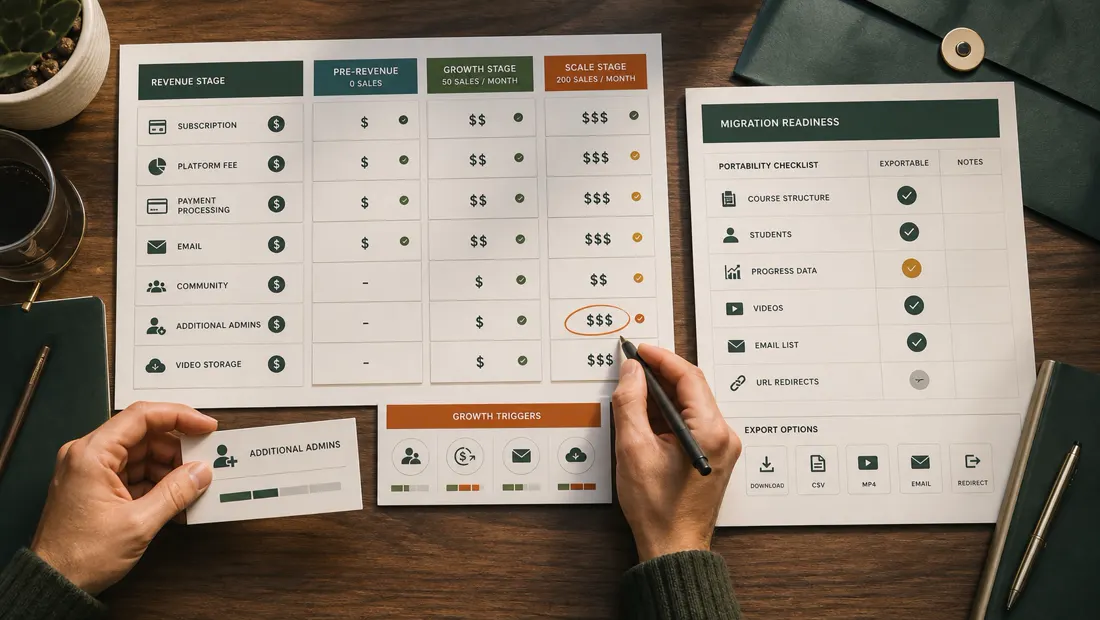
Migration is a material switching cost. Before choosing, verify export coverage for students, progress, orders, subscriptions, content, and custom-domain settings. Give extra weight to the capabilities likely to be needed within twelve months, but do not pay now for speculative scale.
This review gives low weight to AI course generators, very large app catalogs, and white-label mobile apps unless the stated beginner workflow requires them. These can be evaluated later when they solve a documented operating problem.
The Comparison Table
Prices below are monthly, billed annually, current at the time of writing. Always check the pricing page — these shift every year or so.
| Teachable | Thinkific | Kajabi | Podia | LearnWorlds | |
|---|---|---|---|---|---|
| Free plan | Yes ($1 + 10% per sale) | Yes (1 course, 0% fees) | No (14-day trial) | Yes (8% per sale) | No (30-day trial) |
| Cheapest paid plan | ~$39/mo | ~$36/mo | ~$69/mo | ~$39/mo | ~$29/mo |
| Transaction fee on entry plan | 5% | 0% | 0% | 5% | $5 flat per sale |
| 0% fee starts at | ~$119/mo | Every plan | Every plan | ~$89/mo | ~$99/mo |
| Email marketing built in | Basic | Basic | Full (funnels included) | Yes | Basic |
| Community/membership | Add-on | Yes (higher tiers) | Yes | Yes | Yes |
| Time to first launch | Measure in trial | Measure in trial | Measure in trial | Measure in trial | Measure in trial |
| Best for | First-time sellers who want polish | Free-plan validators | All-in-one, funnel-driven creators | Simplicity lovers on a budget | Course quality obsessives |
Four of these five run affiliate programs through major networks (Impact and PartnerStack), which is also why you see them recommended everywhere. Keep that in mind when reading any review in this space — including mine. That's what the disclosure up top is for.
The Individual Reviews
Teachable — the safe default that quietly charges for it
Teachable is often the first name beginners hear, and there's a reason: it has spent a decade sanding down the rough edges of course creation. Uploading videos, dripping content, taking payments in 130+ currencies — it all just works.
Teachable emphasizes checkout, order bumps, upsells, and localized selling capabilities. Test these with fictional products and calculate the effective platform and payment fees at low, expected, and high monthly revenue. Vendor conversion claims should not replace a controlled checkout test.
The catch is the fee structure. The free plan charges $1 + 10% per sale, which is fine for validation and bad for actual business. The ~$39 Basic plan still takes 5% of every sale. Do the math: at $2,000/month in sales, you're paying $39 + $100 = $139/month — nearly the cost of platforms that take nothing. The 0% tier costs ~$119/month.
Pros:
- Best-in-class checkout and payment handling (VAT, currencies, tax paperwork via "teachable:pay")
- Course builder designed for a direct launch workflow; time a representative build during the current trial
- Huge knowledge base and creator community; every problem you hit has been solved publicly
Cons:
- 5% transaction fee lingers until the ~$119/mo tier
- Email marketing is thin — most serious users bolt on ConvertKit or similar ($9–29/mo extra)
- Site customization is limited; Teachable sites look like Teachable sites
Verdict: Choose Teachable if you want the smoothest path from "I have a course idea" to "someone in Germany just bought it," and you accept paying a slice of early revenue for that smoothness.
Thinkific — the beginner's best friend on paper (and mostly in practice)
Thinkific made one decision years ago that still defines it: 0% transaction fees on every plan, including free. For a beginner, that's enormous. Their free plan gives you one full course, unlimited students, and keeps none of your money. It is, as far as I can tell, the best free validation environment in this category.
Thinkific uses a structured chapter-and-lesson model and includes learning features at different tiers. Build the same modules, quiz, completion rule, and certificate in each finalist to determine whether the structure reduces work or creates constraints.
Where Thinkific has historically lagged is marketing. Email capabilities are basic, and the sales page builder, while improved, won't win design awards. The company has pushed hard into communities and mobile in recent years, and the ~$74–149 tiers now bundle memberships and communities credibly.
Checkout conversion varies by audience, price, traffic, payment options, and offer design. Do not rely on old third-party comparisons; send comparable test traffic only when ethically and commercially appropriate, and compare completion, payment failure, refund, and support outcomes.
Pros:
- 0% transaction fees on every plan — the free plan is genuinely usable for validation
- Strong learning features (quizzes, certificates, progress tracking) at low tiers
- Transparent pricing with no forced annual commitment
Cons:
- Marketing and email tools are the weakest of the paid platforms here
- Sales page templates feel dated without customization effort
- Support on lower tiers is email-only and can take a day or two
Verdict: Choose Thinkific if you're pre-revenue and allergic to fees. Validate on the free plan, upgrade when students show up. This is the lowest-risk starting point on this list.
Kajabi — expensive, and occasionally worth every penny
Let's address the price first, because it's the elephant: Kajabi starts around $69/month (Kickstarter tier) with real plans at ~$149–199/month. For someone who hasn't sold anything yet, that's a hard swallow.
Kajabi combines course delivery with email, funnels, website, podcast, and community capabilities. The relevant cost comparison includes every separate tool it can verifiably replace. Demonstrate one opt-in, nurture sequence, sales page, checkout, and student delivery before crediting consolidation savings.
The math can genuinely work. A typical alternative stack — Teachable Basic ($39) + ConvertKit ($29) + Leadpages ($37) — runs about $105/month with three tools to duct-tape together. Kajabi at $149 isn't much more, and everything talks to everything.
Kajabi’s higher fixed cost creates risk before demand is proven. Model the months required to launch and the sales needed to cover the subscription. It is more plausible when an audience or validated offer already exists than when the creator is still choosing a topic.
Pros:
- True all-in-one: email, funnels, website, courses, community, coaching, podcasts
- Best marketing automation in this comparison by a wide margin
- 0% transaction fees, polished templates, excellent mobile apps for students
Cons:
- Cheapest meaningful plan ~$149/mo — punishing if you're pre-audience
- Broader all-in-one setup; time the complete funnel and course workflow rather than only content upload
- Overkill if you only want to sell one course
Verdict: Choose Kajabi if you already have an audience (say, 1,000+ engaged email subscribers or followers) and want to consolidate tools. If you're at zero, start elsewhere and graduate here.
Podia — the calm option nobody regrets
Podia emphasizes a contained interface and multiple digital-product types. Test a course, download, coaching offer, and subscription only if those products are genuinely planned, then measure setup time and buyer clarity.
Podia bundles courses, digital downloads, webinars, and a basic website into plans around $39–89/month. The free plan takes 8% per sale, the ~$39 tier takes 5%, and fees drop to 0% at the ~$89 tier. Email marketing is included, though the more advanced automation moved to a paid add-on during one of their pricing shuffles — check current terms before committing, because Podia rearranges its packaging more often than the others here.
Podia is most relevant when a creator expects to sell a mix of courses, downloads, coaching, or memberships. Compare the total product and email workflow with the cost of separate specialist tools.
The trade-off is depth. Course features are adequate, not rich — no graded quizzes or certificates as of my last test. Analytics are thin. And if you eventually want serious funnels, you'll outgrow it.
Pros:
- Easiest platform here — genuinely 90 minutes to launch
- Sells everything (courses, downloads, coaching, webinars) under one roof
- Friendly, fast support with a reputation beginners rave about
Cons:
- Light on learning features: no certificates, minimal assessment tools
- Transaction fees until the ~$89 tier
- Pricing and feature packaging changes frequently enough that old reviews mislead
Verdict: Choose Podia if the tech itself is what's stopping you. It's the platform least likely to make you feel stupid, and for a lot of first-timers that's worth more than any feature.
LearnWorlds — for when the course itself is the product edge
LearnWorlds is the least famous name on this list and, feature-for-feature on the learning side, arguably the strongest. Interactive video (questions embedded mid-video), transcripts that double as navigation, SCORM support, serious assessments, certificates — if you care about students actually finishing and learning, this platform takes that mission seriously.
Interactive elements can support active learning, but no platform alone proves higher completion. Build the same question, interaction, and completion rule in LearnWorlds and another finalist, then test comprehension and accessibility with representative learners.
Pricing starts at ~$29/month — the cheapest paid entry here — but with a $5 flat fee per course sale, which stings on cheap products (that's 10% of a $50 course) and is trivial on a $500 one. The ~$99 Pro Trainer tier removes the fee and unlocks most of the good stuff.
LearnWorlds exposes more learning-design controls than simpler sellers. Time a representative setup and count the settings that require policy or design decisions before treating flexibility as value.
Pros:
- Best learning experience in the group: interactive video, assessments, certificates
- Cheapest paid entry point (~$29/mo) for testing the waters
- Scales toward serious training businesses (academies, B2B training) without migration
Cons:
- $5/sale fee on the entry plan punishes low-priced courses
- Steepest interface of the five; expect a real learning curve
- Marketing tools are functional but behind Kajabi and even Podia
Verdict: Choose LearnWorlds if your competitive edge is teaching quality — technical skills, certifications, anything where "students actually finish" is your marketing. Skip it if you want fast and simple.
Which One Should You Pick? (By Situation)
There is no universal best platform. Match the choice to current audience, product mix, learning-design needs, and the cost structure that applies before and after validation.
- "I have an idea but no audience and no revenue." → Thinkific's free plan. Zero monthly cost, zero transaction fees, one real course. Validate first. You can migrate later if you must — migrating before you have students is free.
- "I want the most professional buying experience and I'll pay for polish." → Teachable. Accept the 5% early fee as tuition. Upgrade to the 0% tier once revenue justifies it.
- "I already have an email list or social audience ready to buy." → Kajabi. You're the one buyer for whom the $149/month all-in-one math genuinely works from day one.
- "I'm selling a mix of small stuff — templates, mini-courses, maybe coaching." → Podia. Nothing else here handles a product mix this gracefully at this price.
- "My course teaches real skills and completion rates are my reputation." → LearnWorlds. The interactive video features are worth the learning curve.
- "I genuinely can't decide." → Thinkific free plan, this week. A mediocre platform with a launched course beats a perfect platform with a draft. You can be live before Sunday.
Evidence before purchase
Build one identical mini-course before choosing
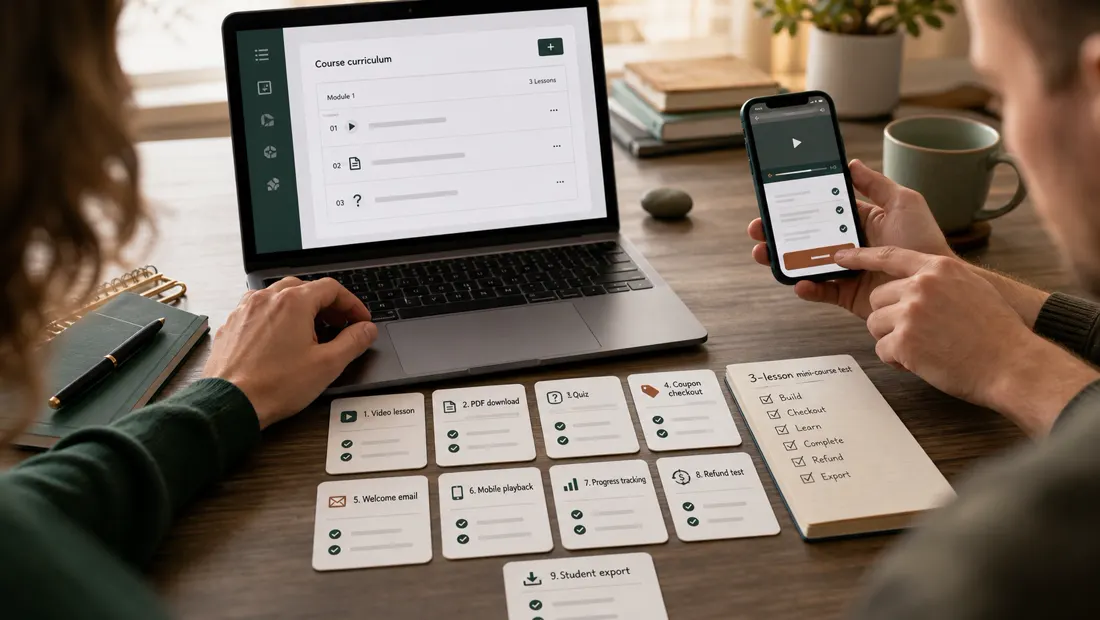
Use owned or fictional content to create three lessons, one download, one quiz, a completion rule, a $100 test offer, a discount, and a refund. Inspect both desktop and mobile student views. Do not invite real customers or process a real charge until the account, policies, tax settings, and support process are approved.
| Checkpoint | Evidence | Pass condition |
|---|---|---|
| Build | Time, unresolved settings, preview | A second person can finish the course setup |
| Checkout | Currency, tax, fees, coupon, refund path | The buyer sees the full amount and terms |
| Learning | Progress, quiz, captions, accessibility checks | The target learner can complete core tasks |
| Operations | Email, support, reporting, user roles | Owners know how exceptions are handled |
| Exit | Student, order, content, and progress exports | Required business data remains portable |
Official resources checked
Use official pages to verify plans, transaction fees, product limits, trials, and renewal terms. Vendor pages do not prove launch speed or student success for your course.
The Bottom Line
The platform usually matters less than a validated offer, useful instruction, and consistent promotion. Fee structure and switching cost should therefore be matched to the creator’s current stage rather than imagined scale.
Pre-revenue? Minimize fixed costs — Thinkific or Podia. Have an audience? Minimize tool sprawl — Kajabi. Somewhere in between? Teachable is the boring, reliable middle path, and boring is underrated.
Shortlist two platforms, build the same small course with fictional data, and record setup time, unresolved questions, checkout clarity, student experience, export coverage, and the twelve-month total. Choose from retained evidence rather than a subjective first impression.
Now go outline module one. The platform was never the hard part.
Affiliate disclosure (again, because transparency shouldn't hide at the top of a page you scrolled past): links in this article to Teachable, Thinkific, Kajabi, Podia, and LearnWorlds may be affiliate links. If you purchase through them, I earn a commission at no additional cost to you. This never affects my rankings — several of these programs pay comparable rates, and I've criticized each product above where criticism was due. Prices and features were verified at the time of writing and change often; always confirm on the official pricing pages.
Ready to narrow the field?
Use the evidence, then choose for your workflow.
Prices and plans change frequently. Re-check the current offer on the provider’s official website before purchasing. Affiliate links may be added after partner approval and will always be disclosed.
Frequently asked questions
What is the best platform for selling a first online course?
Choose the simplest platform that supports your checkout, video delivery, student communication, and required payment country. Validate demand before paying for advanced community or automation features.
How do online course platforms charge creators?
Common costs include a monthly plan, transaction fee, payment processing, email or community add-ons, storage, and higher tiers for affiliates or advanced automation. Model revenue at several enrollment levels.
Can I move a course to another platform?
Course files usually move, but student accounts, progress, discussions, quizzes, certificates, subscriptions, and analytics may not. Check export options and keep original media and curriculum files outside the platform.
Fact-checking note: prices and plan terms can change. Verify current details with the provider before purchasing. Last reviewed August 7, 2026.